
Welcome to our Community
Wanting to join the rest of our members? Feel free to sign up today.
Sign up

Bebop 2 Cannot Connect to My.Parrot Using Free Flight Pro

mamunurrahman

New member
Joined
Dec 5, 2025
Messages
3
Reaction score
1
Hi,

I have successfully connected my Bebop 2 to the Free Flight Pro app using an iPhone 6S. However, I am unable to connect to My.Parrot. I also need to convert my flight logs in .PUD format to JSON format.


Could anyone please advise me on a solution or recommend a tool to convert .PUD files to JSON?


Thank you in advance for your help!
 
Hello mamunurrahman,

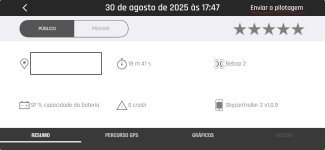
You can simply share the flight in the app and send to your mail in json.zip format.

My app are in portuguese but the position is the same under my.parrot button, my flights and chose tha one you wish to share and "send the flight" to your mail.

the file size for almost 19 minutes flight is less than 512KB

1765626466917.png

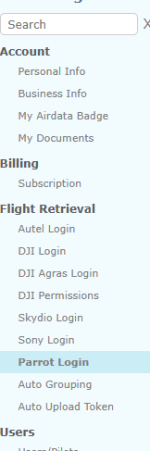
Another option is use airdata.com and sync with your parrot account under Flight Retrieval

1765627127916.png

/Rafael
 
Hi Rafael,
Thank you for your reply and the explanation.
I tried accessing My.Parrot → My Flights in the FreeFlight Pro app, but when I tap My.Parrot, the app asks to connect to the internet. After accepting, it fails to connect and returns to the same page. Because of this, I am unable to use the “Send the flight” option to export the flight as json.zip.
As an alternative, could you please share:
  • A download link for the latest Parrot Bebop Flight Data Manager
  • Availability for Windows and/or Linux
  • Whether it can convert Bebop .pud flight logs to JSON
This would help me extract the flight data without relying on the My.Parrot cloud service.

Thank you very much for your support.

Best regards,
Mamunur Rahman
 
Hello Mamunur,

Here is the explanation and in the end of this post the links to the pub to csv file, nned to install python to run the script

Link to documentation:
bebop_hacking/README.md at master · AutonomyLab/bebop_hacking


PUD files (flight recordings)​

The drone records every flight as a single file in /data/ftp/internal_000/Bebop_Drone/academy.
The file format is self-describing. Each file begins with a null-terminated JSON string listing the columns present in each data packet. For example (pretty-printed here for clarity):
{

"version": "1.0",
"date": "2014-11-30T160423+0000",
"product_id": 2305,
"serial_number": "PI...",
"uuid": "EB...",
"controller_model": "manta",
"controller_application": "Nexus 10",
"run_origin": 0,
"details_headers": [
{
"name": "time",
"type": "integer",
"size": 4
},
{
"name": "battery_level",
"type": "integer",
"size": 4
},
{
"name": "controller_gps_longitude",
"type": "double",
"size": 8
},
{
"name": "controller_gps_latitude",
"type": "double",
"size": 8
}, ...
]
}

This JSON header is followed by fixed-size binary packets, through to the end of the file. There are roughly 30 packets per second.
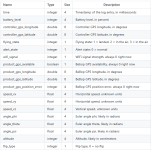
The fields currently present in the log packets are:

The fields currently present in the log packets are:


1765739959361.png

A quick way to dump the data as a table from the shell is to run:
hexdump -s 1379 -e ' "%07_ad|" 2/4 "%8d" 2/8 "%13.7f" 4/1 "%2d" 2/8 "%13.7f " 1/4 "%4d" 6/4 "%12.5f" 1/4 "%6d" 1/1 "%3d" "\n" ' *.pud | more


This repository contains a Python script to convert .pud files into .csv and .kml files (for Google Earth). For .kml support, you'll need the simplekml package, which can be installed trivially using easy_install simplekml. To convert a single .pud file:

./pud_to_csv_kml.py 0901_2014-12-01T162824+0000_F88751.pud


To convert all the .pud files in a directory:
./pud_to_csv_kml.py -d /path/to/directory


To convert all the .pud files in a directory:

./blackbox_to_csv.py -d /path/to/directory
bebop_hacking/blackbox_to_csv.py at master · AutonomyLab/bebop_hacking

bebop_hacking/pud_to_csv_kml.py at master · AutonomyLab/bebop_hacking


BR Rafael
 
Last edited:

New Posts

Members online

Forum statistics

Threads
5,496
Messages
45,601
Members
9,025
Latest member
donaldp63029