
Welcome to our Community
Wanting to join the rest of our members? Feel free to sign up today.
Sign up

Parrot Anafi Gimbal not Calibrating

Apollonas

New member
Joined
Jul 17, 2025
Messages
2
Reaction score
0
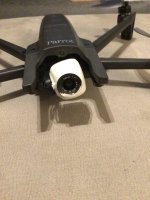
Hello Everybody!!! A few days ago I made a flight with my Anafi Drone. Everything was very smooth, from take off to landing. The next day I saw a Firmware update. Then something strange happened. I tried to do the update but the battery was low. So i turned off the drone, I put on an other battery but there wan no update to do. This happened a few time. I was tired off trying to make the update. So turn off and againg on the drone. This time I saw the gimbal could not calibrate. But I also saw the update notification. I did it, but nothing. The gimbal cannot calibrate, so I cannot flight it. Anybody has any idea why??? PLEASE HELP, I DONT WANNA BUY NEW DRONE FOR A STUPID REASON.


*One thing that i see in the screen is a notification for me to "check if something is blocking the gimbal". Well nothing is blocking it at all. pls Help
 
Saw the video, That is an Anafi FPV version. Never saw that issue. Try these things if one doesn't work move to the next

1. Auto calibrate gimbal in settings from FF6 app menu
2. Reset battery
3. Full reset controller
4. Full reformat micro SD card via FF6
5. Full hard reset drone

If nothing worked maybe gimbal connector is semi loose in drone open it and reconnect. May happen on hard lands or falls?
 
Last edited:
  • Like
Reactions: Crossrich
I'm going through this as well. I was using follow me mode and there was a change in terrain then it fly backwards into my house and fell. The display told me to contact parrot support but we all know how that's going to go.

So I took it apart and tried to see if there were any connections loose. I cleaned all joints where dust would end up. I tested the gimble through the free flight app but it moves up and down ever so slightly like there's friction but when it goes through the calibration processes it loops.

I did the hard reset multiple times via drone and the app and nothing works. There's no calibration setting that will fix this issue unless parrot themselves gives you the software to find the clock position of the gimble. I assume that the software is trying to find it's zero position and it's out of place you can see it when the gimble tries to twist.


If you look at the metal disc behind the camera itself, there's the tiniest pinhole or dimple. I think there's a hall effect sensor in the tiny motor behind it that tells the position and attitude of the drone. If parrot support would reach back out to my email that would be amazing.
 
Hey. I looked at this thread.


I looked at my camera body and moved it up and down all the way to see if it was touching anything. The lip of the lens shelf was barely scraping the ribbon cable on my drone and I mean just the tip. I manhandled the arm back into place and made sure that the motors were loose. I went through the calibration once again and the gimbal successfully completed its cycle and can take off again.

Tilt the camera gimbal all the way down with your hand and look at the bottom of the drone to see if the case of the camera is touching anywhere because clearance is very tight around the back of the camera housing.
 

New Posts

Members online

No members online now.

Forum statistics

Threads
5,496
Messages
45,601
Members
9,025
Latest member
donaldp63029