
Welcome to our Community
Wanting to join the rest of our members? Feel free to sign up today.
Sign up

Deconnexions bebop 2 incessantes

Maximaxence

Member
Joined
Dec 26, 2025
Messages
5
Reaction score
0
Bonjour,

Je possède un bebop 2 et voici le problème :

- La connexion entre le téléphone et le drone ou la manette et le drone est stable et continue quand le drone est allumé, mais pas en vol.

-> Quand je le démarre, au bout d'une minute environ, le wifi se coupe pendant un bout de temps, le téléphone se déconnecte et la manette également, je dois attendre d'obtenir une nouvelle minute de connexion pour le faire atterrir

- Tout ça se passe à 2m du drone, le mode avion est activé sur mon téléphone et la connexion automatique aux autres wifi est désactivée

- Le ventilateur tourne bien en dessous, il n'est pas obstrué et le drone n'est pas chaud quand ça arrive (la surchauffe ne semble pas être la cause)

- pour ce qui est du réseau, j'ai tout essayé : Manuel, différentes bandes, France ou USA etc
Il y a bien un mot de passe configuré sur le wifi du drone

- Le firmware est à jour

- Je l'ai ouvert et tout semble clipsé, aucune nappe déconnectée

- J'ai déjà procédé à une réinitialisation totale et recalibrage

- les tests sont faits en alternants les batteries, pour éloigner la piste de batterie défaillante

Suite à des renseignements j'ai trouvé ces 2 pistes comme les plus probables :
Un câble défaillant mène à un faux contact quand le moteur est en route
Ou la puce réseau est dysfonctionnelle
 
Bonjour Maximaxence,

Comme je ne parle pas français, ces phrases ont été traduites avec Google Traduction.

Pour vous aider, j'ai besoin de plus d'informations :
Quelle manette utilisez-vous ?
Quel est votre numéro de téléphone portable ?
Quelle application et quelle version utilisez-vous ?
Avez-vous activé le mode avion sur votre téléphone et désactivé le Wi-Fi et le Bluetooth ?

Grâce à vos réponses, nous pourrons vous aider.
 
Hello

- I use the Skycontroller 2P, but the connection problems happen with my phone, my controller, and both (the bebop 2 wifi disappears, so it isn't about the app version)
- Because of the issues concerning the compatibility with android phones, i installed freeflight pro and added the obb file to make it work, but the problem occurs with the iphone of someone i know

The bebop 2 firmware is on version 4.7.1 (the last one i think)

Yes, the airplane mode is on, only the wifi is activated with the other wifi's automatic connection turned off
 
Hello Maximaxence,

OK,

Did you made the software reset?

To factory reset a Parrot Bebop drone, power it on, wait for the rear LED to stop flashing, then press and hold the power button for about 10 seconds until the LEDs flash and the drone reboots, wiping settings and data to restore its original state; this process takes several minutes and is great for connection issues.

Step-by-Step Reset Guide:
  1. Power On: Turn on your Parrot Bebop drone.
  2. Wait for Stability: Wait for the LED light at the back of the drone to stop flashing, indicating it's ready.
  3. Initiate Reset: Press and hold the Power button for approximately 10 seconds.
  4. Observe Lights: The drone's LEDs will flash, and the drone will begin its restart sequence.
  5. Patience is Key: The reset process can take a few minutes to complete.
  6. Reconnect: Once it reboots, you'll need to reconnect your device (phone/tablet) to the drone's Wi-Fi network to use it again.
And when this disconets happens do the led in the Skycontroller 2 changes the color?


BR Rafael
 
Yes, I already did the factory reset, and the led never changed color

I can try a last time a factory reset tomorrow, because everything shows that the problem is linked to the motherboard or a cable (motherboard because of the wifi chip), but with a such problem the led color would change

Reminder : The problem occurs after the take-off (1 min, and after a few minutes after the deconnexion i can connect again to make it land)
Before the take-off, the wifi never disappears during tens of minutes
 
Hello @Maximaxence,

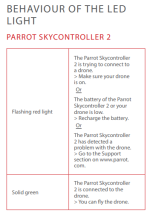
If the led never changed the color the problem is not the wifi link, here is the description from parrot manual:

1766788679435.png

So, by elimination the usb port or cable is defective. to test this use the cellphone wifi and connect to the drone direct and se if the connection is stable.

Good luck.


BR Rafael
 
I said in my first message that the problem is the wifi connection :

I use my cellphone -> it disconnects after 1 minute of flight

I use the controller -> same thing, the controller led turns red and it disconnectd

I thought you were talking about the blue led in the back of the drone, sorry
 
Hello,

So you are right, the problem is the wifi chip.

Try to Connect at Home and outside and try timing the conection time, if the connection hold longer outside so the problem is bad cooling, maybe the thermal paste need to be changed.

I don’t know where you are but france/Canada etc.. are pretty cold now, so should be a Big difference between inside/ouside temperature.
 
Yes, today it was -4° Celsius outside and it didn't hold longer, and the drone wasn't really hot

So this is 95% the wifi chip, couldn't it be a cable moving because of the movement when it flies ?
 
Agree,

Maybe, from now only four possible causes left, the antenna cable, firmware or the voltage regulator/wifi chip

Try to connect via WIFI while the drone stands very still, without moving anything, and check if the connection gets stable.
 

New Posts

Members online

No members online now.

Forum statistics

Threads
5,496
Messages
45,601
Members
9,025
Latest member
donaldp63029