
Welcome to our Community
Wanting to join the rest of our members? Feel free to sign up today.
Sign up

Anafi + QGroundControl

Hi @looninho,

Thanks for sharing your QGC flightplan.
I realize that my script requires a typical mission like this:
Mission Start
Takeoff
Survey
Return To Launch

For the last command, the script reveals my own vision: the Return To Launch command (MAVLink code: 20) is the most appropriate to get the drone back to the starting point.
If we indicate a Land command (MAVLink code: 21), the script crashes miserably...

Now, your questions:
1) Do we need to connect Anafi 4K to QGC to create flight plan?
No, we don't need to connect Anafi to QGC (via WiFi).

2) for the camera selection Sony > IMX230 doesn't exist in QGC, so Parrot > Sequioa RGB is right?
IMX 230 is not listed in QGC, but we can enter the values manually, like this:
View attachment 6452
Hoping to have helped you on these points (a bit technical), don't hesitate to make any other comments if you wish!

epysod12
Hi @epysod12,

Thank you for your reply and for your camera parameters.
As I don't have the In-App FlighPlan for FF6, I'll try to convert your code to output MAVLink file for use with the Android app given in Parrot Developers Github.

Loony
 
So, I can confirm that QGroundControl works perfectly fine with the Parrot ANAFI. You can plan the mission on Mac, PC or iOS, and upload and start the mission to the drone from either device (I’ve not tested Android since I don have an Android device).

One thing to be aware of:
To start the mission, you need to connect directly to the drone on the Wi-Fi, not via the controller. You upload the file, arm the drone and start the mission. This means that you will lose connection when the drone flies off - it‘s not a big deal for the mission, as it will progress without. But to make sure you fly safely, you need to disconnect the device and start the controller so it connects to the drone instead. The drone only accepts one controller at a time. This way you can take control if something unforeseen happens.

I don’t recommend using the freeflight app when reconnecting with the controller - it seemed to interrupt the mission, as many photos were missing when I did (I’ve seen the same happening with Pix4Dcapture as well).

One thing I miss is the ability to set the gimbal pointing upwards. If anyone knows how to do that tips would be appreciated! The camera setting tab is not present in QGC when I connect the ANAFI so I can’t define it in the app like it says in the user manual, and if I try to set it manually I get warnings.
Edit: just realised that you can check a “Force save” box in the gimbal settings and save negative values.. I assume that would make the gimbal point upwards, as 0 is straight ahead and 90 is straight down.

Also, there is no support for elevation maps further than 60°N, but further south it seems to work perfectly.

To preview the missions in 3D is a bit fiddly though, but highly recommended as it sometimes sets some strange values between missions:
1) Save the mission as .kml
2) On iOS, connect to your device to a computer and find QGC in the “Files” tab on Mac or through iTunes on PC. Copy the “Missions” folder to a known place on the computer. If you use QGC on the computer, navigate to the default folder and find the “Missions” folder there.
3) Open Google Earth on your web browser or the app. Choose “Projects” and upload your .kml file.

If you want to copy a mission file from your computer to an iOS device, just drag and drop the mission folder into the QGC app in the “Files” tab in Finder on Mac or iTunes on PC. It will overwrite the old folder. Also, always double check that all heights are set correctly before take-off, as it sometimes resets if you reopen the file, and use a waypoint back to takeoff before using the “return to takeoff” function, unless you want the drone to descend on its way back.
Hey there, I hope this blog is still active, I´ve run into similar issues and need to get it working for my work ASAP.
I´ve been working on this connection issue between Anafi Ai and QGC for a few days now and I still can´t resolve it.
I opened an github issue, but I was told that my wifi connection is the problem and that I should try here...

Thanks so much for your help!
 
  • Like
Reactions: aerialwhidbey
Hi @epysod12,

I'm using your script. However, I'm getting an error. A screenshot of the error and the QGC file are attached. Please help.

Thank you.

Files
 
Hi @woodu16 ✋

Thanks for your feedback, here are my observations:

1. The IMX 230 camera sensor is not listed in QGC, you must enter the values manually, as shown here:
Anafi + QGroundControl

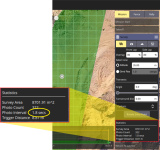
2. Photo Interval needs value >= 2 seconds.
Change Flight Speed (in Mission Start) and/or Altitude (in Survey) to obtain a minimum 2 seconds between each trigger.
For example, if Photo Interval is 1.8 seconds, the ANAFI starts the flight plan and stop/block during the flight...

3. Since my script is Linux-oriented, so here is a modified version for Windows 😉
On Windows, when writing CSV files with the csv module, you must open the file with the newline='' option, otherwise Python inserts an empty line between each record.

Three lines are affected here:

Line 189:
with open(newPath + '/' + 'uavMavCmd.csv', 'w', newline='') as uavMavCmd:

Line 289:
with open(newPath + '/' + 'survAzDst.csv', 'w', newline='') as survAzDst:

Line 334:
with open(newPath + '/' + 'wayPoints.csv', 'w', newline='') as wayPoints:

Et voilà ! :cool:

Can you test it and tell me if it works?
 

Attachments

  • Like
Reactions: Miningnew
Hi @woodu16 ✋

Thanks for your feedback, here are my observations:

1. The IMX 230 camera sensor is not listed in QGC, you must enter the values manually, as shown here:
Anafi + QGroundControl

2. Photo Interval needs value >= 2 seconds.
Change Flight Speed (in Mission Start) and/or Altitude (in Survey) to obtain a minimum 2 seconds between each trigger.
For example, if Photo Interval is 1.8 seconds, the ANAFI starts the flight plan and stop/block during the flight...

3. Since my script is Linux-oriented, so here is a modified version for Windows 😉
On Windows, when writing CSV files with the csv module, you must open the file with the newline='' option, otherwise Python inserts an empty line between each record.

Three lines are affected here:

Line 189:


Line 289:


Line 334:


Et voilà ! :cool:

Can you test it and tell me if it works?
You're great, it works perfectly. Thank you very much and best regards. :D :D :D
 
Hey there,

my main question: Is there any way to tell QGC to use a Joystick as Radio?

I got a successful connection to my Anafi AI on QGC on the field yesterday, but I wasn´t able to start a mission, because "Vehicle not changing to Mission flight mode" and Radio setup required.
Actually I don´t care if I can´t fly manually, but it urges me to connect to a radio anyway...
Sadly the Skycontroller didn´t get recognized as radio when plugged in via USB.
I just tested with my ps4 controller, it could be setup as a Joystick, but not as a radio either!
Will it be sufficient to assign "Mission" (and the flight axis) to my ps4 controller to start a mission?
After setup of the joystick the radio icon is still red and tells me that setup is required, so I´m not convinced it´ll work.
Flight testing is complicated for me, so I don´t want to drive out just on a hunch..
I guess Anafi Ai won´t bind to CRSF (option on QGC-Radio page) since it uses it´s own radio protocol, so it shouldn´t make a difference if I use my EdgeTX controller with CRSF/USB instead...?
It´ll probably recognize any controller connected to USB as a joystick, right?
Thank you very much for any help!
Cheers
 
Hi all,

First of all, thank you for all your super helpful comments and advice on here. You all rock!

I have an Anafi USA and following all your advice I carried out a photogrammetric survey last weekend. I had no issues connecting to the aircraft and uploading the mission. The flight went really well in fully autonomous mode. The only problem I have is that the pictures all came out blurry. The photo interval was set to 2.5 secs with a flying speed of 10 m/s. I think that's a reasonable speed and interval. I did notice that the resolution of my saved pictures is really weird. When I previously flew the Anafi USA with Pix4D Capture the images were saved with a resolution of 4068x3456. I used that resolution to set my custom camera parameters in QGC along with a focal length of 4mm. However all the pictures were saved with a resolution of 2304x1728 and a focal length of 16 mm.

Has anyone experienced this? How do I ensure the photos come out sharp? Are there an other places in the QGC app where I need to adjust the camera parameters beside within the survey tab?

Thank you all!
 
Hey there,

my main question: Is there any way to tell QGC to use a Joystick as Radio?

I got a successful connection to my Anafi AI on QGC on the field yesterday, but I wasn´t able to start a mission, because "Vehicle not changing to Mission flight mode" and Radio setup required.
Actually I don´t care if I can´t fly manually, but it urges me to connect to a radio anyway...
Sadly the Skycontroller didn´t get recognized as radio when plugged in via USB.
I just tested with my ps4 controller, it could be setup as a Joystick, but not as a radio either!
Will it be sufficient to assign "Mission" (and the flight axis) to my ps4 controller to start a mission?
After setup of the joystick the radio icon is still red and tells me that setup is required, so I´m not convinced it´ll work.
Flight testing is complicated for me, so I don´t want to drive out just on a hunch..
I guess Anafi Ai won´t bind to CRSF (option on QGC-Radio page) since it uses it´s own radio protocol, so it shouldn´t make a difference if I use my EdgeTX controller with CRSF/USB instead...?
It´ll probably recognize any controller connected to USB as a joystick, right?
Thank you very much for any help!
Cheers
Maybe I'm a little late at responding, but did you arm the vehicle before starting the mission?
 
Hello :D

@ptaube

Were you able to configure QGC with a joystick?

In previous tests, I managed to connect the SkyController to the PC (via USB) and it "seemed" to work...
At that time, my goal was to implement programmed flights and be able to take control of the drone (i.e. interrupt the mission).

Since then, I haven't tried again. Instead, I've been exploring the possibilities of FF6 missions, using my own flightplan converter ;)
And finally, since I don't own an Anafi AI, my expertise in this area is limited...

Thanks for your feedback!

@spaghettijo

The parameters to enter in QGC seem correct: note that it's indeed 4608 × 3456 (not 4068 × 3456) for the resolution and 4 mm for the focal length.

Did you also specify 5.99 × 4.5 for the sensor size, as indicated here:
Anafi + QGroundControl

When using QGC with Anafi, the protocol used is indeed MAVLink, but Anafi has its own interpretation of it.
However, these observations are based on my own experience with an Anafi 4K, not the USA model. The image sensor appears to be the same (Sony IMX 230) according to the online documentation.

You also mentioned using the qgc-to-ff6 Python project, thank you for sharing your experience ;)

In this case, the resolution of the resulting photos will be 5344 × 4016 (JPEG WIDE).

It's true that I haven't provided much documentation on the script's implementation, especially the file transfer to the tablet/smartphone. I'm currently working on that.

The Python3 script generates a savedPlan.json file in a folder. This folder and its contents can easily be copied directly to this location : FreeFlight6 > FlightPlan (tablet/smartphone).
Note that I'm basing this on the FF6 application for the Anafi 4K (version 6.7.6).

After that, I use an application to refresh my Android smartphone's memory, with the following:
This allows for quick memory updates and easier access to the flightplan from FF6.

When you have time, please let me know if these explanations were helpful.

For my part, I'm currently writing the step-by-step documentation, which will help clear up doubts about many things.

Have a nice day 🫶
 
Last edited:
Hello :D

@ptaube

Were you able to configure QGC with a joystick?

In previous tests, I managed to connect the SkyController to the PC (via USB) and it "seemed" to work...
At that time, my goal was to implement programmed flights and be able to take control of the drone (i.e. interrupt the mission).

Since then, I haven't tried again. Instead, I've been exploring the possibilities of FF6 missions, using my own flightplan converter ;)
And finally, since I don't own an Anafi AI, my expertise in this area is limited...

Thanks for your feedback!

@spaghettijo

The parameters to enter in QGC seem correct: note that it's indeed 4608 × 3456 (not 4068 × 3456) for the resolution and 4 mm for the focal length.

Did you also specify 5.99 × 4.5 for the sensor size, as indicated here:
Anafi + QGroundControl

When using QGC with Anafi, the protocol used is indeed MAVLink, but Anafi has its own interpretation of it.
However, these observations are based on my own experience with an Anafi 4K, not the USA model. The image sensor appears to be the same (Sony IMX 230) according to the online documentation.

You also mentioned using the qgc-to-ff6 Python project, thank you for sharing your experience ;)

In this case, the resolution of the resulting photos will be 5344 × 4016 (JPEG WIDE).

It's true that I haven't provided much documentation on the script's implementation, especially the file transfer to the tablet/smartphone. I'm currently working on that.

The Python3 script generates a savedPlan.json file in a folder. This folder and its contents can easily be copied directly to this location : FreeFlight6 > FlightPlan (tablet/smartphone).
Note that I'm basing this on the FF6 application for the Anafi 4K (version 6.7.6).

After that, I use an application to refresh my Android smartphone's memory, with the following:
This allows for quick memory updates and easier access to the flightplan from FF6.

When you have time, please let me know if these explanations were helpful.

For my part, I'm currently writing the step-by-step documentation, which will help clear up doubts about many things.

Have a nice day 🫶
Thank you for your response @epysod12 !

As for the camera settings, I have not tried re-flying with those specific settings yet. I've been using the PX4 Pro protocol with the Anafi USA. Based on what you're saying shall I try the Mavlink Generic protocol instead? The flight mission did complete using the PX4 Pro protocol, but maybe it is unable to set up the camera properly.

Regarding your QGC to FF6 converter script, I believe I can not use it for the Anafi USA unfortunately. The FF6 app at version 6.7.6 is not compatible with the Anafi USA's Skycontroller 4.

Thanks again for all your help!

Edit: @epysod12 I carried out another test flight using the Mavlink Generic protocol in QGC as well as setting the camera settings like you suggested:
Sensor size: 5.99*4.5
Resolution 4608*3456
Focal length: 4mm

The Anafi USA flew fine with the Mavlink Generic protocol. Put pictures are still blurry and the resolution is not correct. I am attaching one of the captured photos. It seems that the Anafi USA doesn't read the camera information from QGC.
 

Attachments

  • P2563099 - Copy.JPG
    P2563099 - Copy.JPG
    175.9 KB · Views: 5
Last edited:
Another update for you @epysod12. The FF6 6.10.5 App does not come with a flightPlan folder inside the App folder structure. I realized that once I created a flightPlan folder then I can save and load flight plans in the FF6 App. As a result I was able to upload the savedPlan.json file inside the App too. So I can confirm that your code is also compatible with the Parrot Anafi USA. I also realized that once I import your flight plan in the FF6 App I could modify the plan to use the rectilinear camera. So overall great work supporting the Anafi community, and thank you so much!
 

New Posts

Members online

No members online now.

Forum statistics

Threads
5,496
Messages
45,601
Members
9,025
Latest member
donaldp63029