
Welcome to our Community
Wanting to join the rest of our members? Feel free to sign up today.
Sign up

Anafi Water Damage - "Camera Error" & "Gimbal Unavailable" after a few days

patrickvuu

Member
Joined
Jan 31, 2026
Messages
5
Reaction score
0
Hi everyone,

I need some expert advice on a water-damaged Parrot Anafi.

The Backstory:The drone had a water landing a few days ago. I managed to dry it out, and surprisingly, it flew perfectly fine for about 2-3 days after the incident. However, it has now completely stopped working properly.

Current Issues:

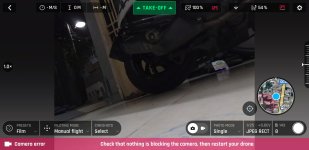
  • Camera Error: Persistent "Check that nothing is blocking the camera" message.
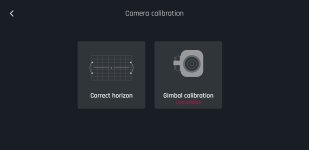
  • Gimbal Failure: The "Gimbal calibration" option is Unavailable (greyed out).
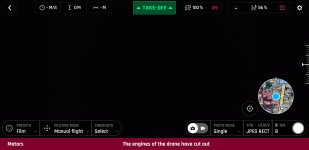
  • Motor Error: The app shows "The engines of the drone have cut out."
  • Video Feed: The horizon is completely tilted.
The Situation:I suspect that internal corrosion (oxidation) has finally set in on the gimbal flex cable or the connectors. Since it worked for a few days before failing, I'm hoping it's just a specific component that died rather than the entire mainboard.

Questions:

  1. Given it was water-damaged, is it more likely to be the Gimbal Flat Cable or the Gimbal Control Board?
  2. Has anyone successfully cleaned an Anafi board after oxidation set in, or is it a "replace only" situation now?
  3. Any tips on which specific connectors I should clean with Isopropyl Alcohol first?
Any advice from those who have repaired water-damaged Anafis would be a lifesaver. Thanks!
 

Attachments

  • e6b0d647-f7e2-480d-a0fa-6b98f2bba68b.jpg
    e6b0d647-f7e2-480d-a0fa-6b98f2bba68b.jpg
    48.9 KB · Views: 5
  • 39d8805b-c97b-46cf-a0ca-1ea6e3e7b61a.jpg
    39d8805b-c97b-46cf-a0ca-1ea6e3e7b61a.jpg
    99.7 KB · Views: 5
  • 7384803f-7b47-44f5-81c1-5dc148d87d85.jpg
    7384803f-7b47-44f5-81c1-5dc148d87d85.jpg
    77.9 KB · Views: 5
If I were you I would take the Anifi fully apart following the YouTube videos and inspect all the circuit boards and leads for physical damage. Also make sure that all the connectors on the cards are fully seated when re-assembling. You also need to carefully take the white cover off the camera and look for damage.

If the gimbal flat cable is damaged then unfortunately it is almost impossible to repair or get a replacement.

Can you also not post the same request 3 times in the forum. It is bad manners and confuses any people who may be able to help you.
 
If I were you I would take the Anifi fully apart following the YouTube videos and inspect all the circuit boards and leads for physical damage. Also make sure that all the connectors on the cards are fully seated when re-assembling. You also need to carefully take the white cover off the camera and look for damage.

If the gimbal flat cable is damaged then unfortunately it is almost impossible to repair or get a replacement.

Can you also not post the same request 3 times in the forum. It is bad manners and confuses any people who may be able to help you.
"Hello,

Thank you very much for your detailed technical advice. I will follow your recommendations: I'm going to carefully disassemble the Anafi using YouTube videos, inspect the circuit boards, and ensure all connectors are properly seated. I will also be careful with the camera cover and the gimbal flat cable.

Regarding the multiple posts on the forum, I sincerely apologize. It was a handling error on my part; I had no intention of spamming or being rude to the community. I will make sure it doesn't happen again.

Thanks again for your valuable help."
 

New Posts

Members online

No members online now.

Forum statistics

Threads
5,496
Messages
45,601
Members
9,025
Latest member
donaldp63029