
- Joined
- Jul 30, 2025
- Messages
- 4
- Reaction score
- 1
Hi everyone,
I’m developing an application with the Anafi AI in confined environments — specifically inside pipes.
I’m facing a major stability problem both in simulation and on the real drone:
I also post my problem on the parrot dev forum : forum.developer.parrot.com/t/visual-odometry-issue/28169
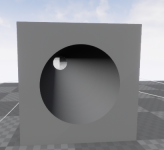
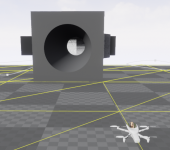
when the drone enters a pipe (similar to the one shown in the image), it becomes completely unstable and drifts in a random direction within the XY plane.
This drift happens both while hovering and during manual/automatic control, making precise operation very difficult.
It looks like some form of visual correction is kicking in, especially in environments with repeating or uniform textures.
Here are the tests I’ve done:
The issue appears to be specific to Anafi AI’s visual positioning/optical flow pipeline.
Has anyone experienced this behaviour?
Any insights on how to mitigate or disable the problematic corrections would be very helpful.
Thanks in advance.
I’m developing an application with the Anafi AI in confined environments — specifically inside pipes.
I’m facing a major stability problem both in simulation and on the real drone:
I also post my problem on the parrot dev forum : forum.developer.parrot.com/t/visual-odometry-issue/28169
when the drone enters a pipe (similar to the one shown in the image), it becomes completely unstable and drifts in a random direction within the XY plane.
This drift happens both while hovering and during manual/automatic control, making precise operation very difficult.
It looks like some form of visual correction is kicking in, especially in environments with repeating or uniform textures.
Here are the tests I’ve done:
- Inside a pipe with poor/low-quality texture → the drone is stable.
- With high-definition texture → the instability appears again.
- I observe similar drift when flying above flat surfaces (no texture, good texture, or poor texture).
- Anafi 4K does not show this issue, neither in simulation nor real flights.
- Tested different control interfaces: SkyController, QDroneCtrl, Olympe, and AirSDK — the problem persists in all cases.
The issue appears to be specific to Anafi AI’s visual positioning/optical flow pipeline.
Has anyone experienced this behaviour?
Any insights on how to mitigate or disable the problematic corrections would be very helpful.
Thanks in advance.