
Welcome to our Community
Wanting to join the rest of our members? Feel free to sign up today.
Sign up

Drone tilts forward when powered up

Hi - so I went through the procedure and went to make offer. I made an offer and it was accepted but the invoice received was a so showed.

I will purchase another as the last one and first one were cancelled

I just wonder now however if a second hand drone might be just as useful as I will get 4
 
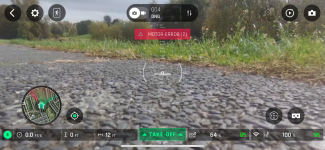
I have now fitted a new motor new from Canada, bought a new battery and purchased new rotor blades. Took the drone out and have this errorIMG_7021.png
 
Second phase.

Having now returned home and stripped down the motor housing, cleaning any necessary parts I have now located the problem. Not sure how I fix it but let me explain

With 3 rotors on the drone and leaving the affected rotor off the new motor the drone is fine. Well I say fine as the drone all 4 motors including the one with no rotor spin as I would expect. However as soon as I att h and place the final rotor onto the drone and start the take off mode, that is where I get the error

So any rotor and I have 4 brand new ones right out of the packet. The two white ones are new - motor B is a new rotor but whether old or new the one on the new motor when fitted is causing the error
 
There are 2 types of motors - "A" (Anticlockwise) and "C" (Clockwise). Did you use the correct type? What are you referring to as "motor B"?

Make sure you're putting the correct prop on the motor.

Moror error 2 often refers to a motor binding or dragging. Probably drawing excess power. Debris in the motor will cause that error. Check the mounting. If the motor not mounted squarely it might cause an error 2.
Try spinning the prop by hand (no power) and compare how it feels to the others. It shouldn't drag, and you should feel the magnets grabbing as you spin it.
Try a different motor if you have one (be sure to use the correct "A" or "C" type!). if you don't have a spare of the correct type, swap it with the one that's diagonally opposite (diagonal motore are always the same type) and see if the problem moves with the motor. If the problem moves with the motor, replace it. if not, check the connector and wiring carefully....
 
There are 2 types of motors - "A" (Anticlockwise) and "C" (Clockwise). Did you use the correct type? What are you referring to as "motor B"?

Make sure you're putting the correct prop on the motor.

Moror error 2 often refers to a motor binding or dragging. Probably drawing excess power. Debris in the motor will cause that error. Check the mounting. If the motor not mounted squarely it might cause an error 2.
Try spinning the prop by hand (no power) and compare how it feels to the others. It shouldn't drag, and you should feel the magnets grabbing as you spin it.
Try a different motor if you have one (be sure to use the correct "A" or "C" type!). if you don't have a spare of the correct type, swap it with the one that's diagonally opposite (diagonal motore are always the same type) and see if the problem moves with the motor. If the problem moves with the motor, replace it. if not, check the connector and wiring carefully....
Hello Bob thanks for the reply - very kind of you

I have replace motor A after the crash. I see no obstruction or dirt and without the rotor blade it moves freely. As soon I apply any rotor, I get the error. All other motors turn as expected with or without rotors
 
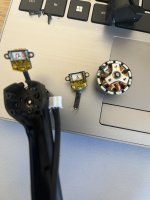
The image shows the broke ‘A’ motor and on the left shows the new motor installed
 

Attachments

  • IMG_7022.jpeg
    IMG_7022.jpeg
    2 MB · Views: 2
You're missing a screw on the mounted motor in the picture. There's a lot of torque on those mounts - but only when the propeller is on. That looks like it might be the problem...
 
You are correct there is a small screw missing so I took it out of motor ‘C’ and now motor ‘A’ has all 3 screws.
Fired up the drone and error 2 still
 
Again, an error 2 is caused by the motor drawing excess current. Since it only happens with the prop on, it sounds like it's marginal. A little too much drag on the motor.
Does that motor feel any different from the others when you spin it (prop on) by hand? The next thing I'd do is try swapping it with the diagonal counterpart (the other, working "motor A"). If the problem moves with the motor, it's a bad motor.
If the problem is still on the same leg where it started (after swapping the two motors), it could be the wiring harness or driver circuit on the main board. You can check continuity of the harness and look for shorts, but i don't think it's that.
There's also a chance that a really bad, unbalanced prop (post crash?) might cause an error 2. Check that prop you're using on it. Again, be sure to use an "A" type prop.
If the problem persists after swapping with a known, good motor and checking the harness, you've likely narrowed it down to a bad main board driver. That's not good. A new main board costs more than a used drone...
 
Thank you for your detailed reply. I intend to swap the motors as suggested. If that fails the EBAY seller of the motor has asked for feedback. Failing that it will be stored in the garage and my drone days wil be over.
 
I swapped the motor back left to front right and I get the same experience. The motor (new one) has very kindly been refunded and as such I am going to park the drone and look for something else
 

New Posts

Members online

No members online now.

Forum statistics

Threads
5,491
Messages
45,591
Members
9,011
Latest member
Neo1