I have done this operation a few times in the past. Today after installing FF6 on a new smartphone, I can't find the "com.parrot.freeflight6" folder, in OBB which is empty. Can you help?Thank you. It solved the problem.

Welcome to our Community
Wanting to join the rest of our members? Feel free to sign up today.
Sign up

You are using an out of date browser. It may not display this or other websites correctly.
You should upgrade or use an alternative browser.
You should upgrade or use an alternative browser.
Freeflight 6 mod app - With Special Features
- Thread starter AnafiPilot1
- Start date
I have done this operation a few times in the past. Today after installing FF6 on a new smartphone, Android 14, I can't find the "com.parrot.freeflight6" folder, in OBB which is empty. Can you help?What you need to do is to:
- Download Freeflight 6 from the Play Store
- Open the app and let it load (1-2 sec)
- Download a file manager like Solid Explorer and grant all permissions it asks.
- Go to your Internal Storage > Android > obb (it might ask for another permission, just click use this folder)
- You'll see a folder named "com.parrot.freeflight6" which you need to rename to something else (eg: "com.parrot.freeflight5")
- Then uninstall Freeflight 6
- Download the modded version and install it, but DO NOT START
- Go back to the file manager, and rename the folder to the original name, which is "com.parrot.freeflight6"
- Start the modded version.
Last edited:
Can anyone help, or are Anafi matters closed?I have done this operation a few times in the past. Today after installing FF6 on a new smartphone, Android 14, I can't find the "com.parrot.freeflight6" folder, in OBB which is empty. Can you help?

Liger 1956
Well-known member
Thanks for your help. No, I don't have it anymore. Where can I find this? The version I installed is freeflight 6, downloaded from Google Play, on November 18th of this year.Can you not copy the OBB file from your old device to your new phone?
Obrigado pela ajuda. Não, não tenho mais. Onde posso encontrar isso? A versão que instalei é o freeflight 6, baixado do Google Play, em 18 de novembro deste ano.Você não consegue copiar o arquivo OBB do seu dispositivo antigo para o novo?
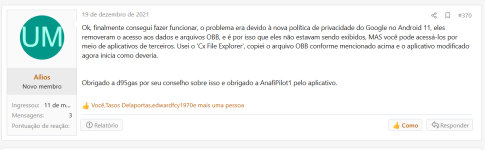
Okay, it's resolved. It seems like the problem is old. I found this information (attached photo) and solved it. The problem was that the file explorer I used did not 'see', inside the folder OBB.Thanks for your help. No, I don't have it anymore. Where can I find this? The version I installed is freeflight 6, downloaded from Google Play, on November 18th of this year.
Sorry, the photo came out in Portuguese, what he says is that the fact is due to the prohibitions in the latest versions of Android, which do not allow you to see the OBB folder. Using the explorer 'Cx File Explorer' the contents of the folder appear.
Attachments
Last edited:
Liger 1956
Well-known member

RESOLVED. Fact is due to the prohibitions in the latest versions of Android, which do not allow you to see the OBB folder. Using the explorer 'Cx File Explorer' the contents of the folder appear.Can anyone help, or are Anafi matters closed?

dimdoum
Member
- Joined
- Dec 6, 2024
- Messages
- 5
- Reaction score
- 7
Hi everyone, and many thanks to @AnafiPilot1 and @ds2atc for their work on these modded FF6. I just got a second hand Anafi because I found it to be the best fit for my use for this price. What I did not expect is that most software maintenance from Parrot would be over by now... So, I managed to install a FF6 normal version, then @AnafiPilot1's modded version, but what I really needed was the Flight Plan mode... And I even tried to buy it in the Android store... But after many search I understood that there was no hope to get it officially, and I did not found any unofficial way either. I tried Pix4D Capture, and went around the rectilinear 16MP limitation. Then I have been looking at Parrot's APIs, which looks great, but I do not have enough time and motivation to code something from scratch to use flight plans, and I also think it's much more convenient to load flight plans from the "regular" piloting app. Well, I finally got into this post:
So thank to @ds2atc effort to summarize how he modded FF6, I found a simple way to unlock the Flight plan and Follow me modes. They are both natively included in the app, but just locked until you buy them. Since buying is not anymore possible in Android, I think that it is ok to share an unlocked version. There are a bunch of Anafis in good condition on the second-hand market, it would be a shame to throw them away because of a software problem. They can still be useful to anyone who cannot afford a brand new high-end professional drone. Sorry I'm digressing a bit
So, I made a modded version of @AnafiPilot1's modded version of FF6. For now, I only produced the FF6_6_7_6_SE_BATTERY mod, which I called FF6_6_7_6_SE_BATTERY_ADDONS. I'll make the FF6_6_7_6_FFC_BATTERY_ADDONS as quickly as possible. The apk is available on this drive:
 drive.google.com
And I also added the necessary obb to install the app, because anyone getting an Anafi right now could be unable to install even the official version... (That was my case, luckily I found an xapk including the obb).
Hope this will help !
In case I don't have time to modify or I sell or lose my Anafi, I will write down what I have done for modification here.
1. get apk
The best way to get an apk file is getting it from your device. There are many methods to do this. I use LG backup to get it.
or use apkmirror.com if you trust that site.
get the latest version(which you will modify) and the same version of original file of the latest modded version you can get.
also get the latest version of modded one here.
2. get apktool
From FF6 6.5.0 update, only apktool 2.4.0...
1. get apk
The best way to get an apk file is getting it from your device. There are many methods to do this. I use LG backup to get it.
or use apkmirror.com if you trust that site.
get the latest version(which you will modify) and the same version of original file of the latest modded version you can get.
also get the latest version of modded one here.
2. get apktool

So thank to @ds2atc effort to summarize how he modded FF6, I found a simple way to unlock the Flight plan and Follow me modes. They are both natively included in the app, but just locked until you buy them. Since buying is not anymore possible in Android, I think that it is ok to share an unlocked version. There are a bunch of Anafis in good condition on the second-hand market, it would be a shame to throw them away because of a software problem. They can still be useful to anyone who cannot afford a brand new high-end professional drone. Sorry I'm digressing a bit
So, I made a modded version of @AnafiPilot1's modded version of FF6. For now, I only produced the FF6_6_7_6_SE_BATTERY mod, which I called FF6_6_7_6_SE_BATTERY_ADDONS. I'll make the FF6_6_7_6_FFC_BATTERY_ADDONS as quickly as possible. The apk is available on this drive:
FF6_MOD_ADDONS - Google Drive
drive.google.com
And I also added the necessary obb to install the app, because anyone getting an Anafi right now could be unable to install even the official version... (That was my case, luckily I found an xapk including the obb).
Hope this will help !
steenkiste.baptiste@gmail
New member
- Joined
- Dec 9, 2023
- Messages
- 4
- Reaction score
- 1
Salut et merci ça fonctionne !!!
Pourrais tu m'expliquer ou me faire un tuto comment tu as fait?
ça serait super sympas!
Pourrais tu m'expliquer ou me faire un tuto comment tu as fait?
ça serait super sympas!
dimdoum
Member
- Joined
- Dec 6, 2024
- Messages
- 5
- Reaction score
- 7
You're welcome ! However, I think I already gave many hints on how I did this, based on a detailed procedure already described by another member of the forum. If you have some coding skills and are curious enough I have no doubts that you will quickly find how to do this. If you don't, I am sorry but I will not make any tutorial for you because I do not have time for this, and although it does no prejudice to Parrot to unlock an addon that is no longer sold, it is borderline enough to avoid giving all the details.
Hi!
There'ss a surefire way to restore the functionality of the FreeFlight 6 app for Anafi/Anafi Thermal. I used this method and it works. It probably works on most new devices. I wasted a lot of time on it, but with the help of information from this forum and a bit of ingenuity I managed problem to achieve that goal. Right now the app works without a problem on my Samsung S23 with Android 14 on board.
Below is the solution to the problem that worked in my case:
1. Install the original FreeFlight 6 application from the Google store on a smartphone that supports this application (in my case Huawei P10).
2. In the android/obb/com.parrot.freeflight6 folder, the file main.xxxxxxxx.com.parrot.freeflight6.obb will be created, where xxxxxxxx is an 8-character number - I don't know what it depends on and I don't know if it works as a result of transferring between devices in different locations around the world... This file (obb) should be copied - sent it to an external drive or download to a computer via USB connection.
3. On the new device, create the same folder - android/obb/com.parrot.freeflight6.
4. On the new device, install the FreeFlight 6 application or one of the mods available on this forum.
5. In the event of a data synchronization error (message - no internet/network connection, despite the fact that there is a connection), exit the application and copy the previously downloaded content from a compatible device to the created directory on the new device (file main.xxxxxxxx.com.parrot.freeflight6.obb into folder android/obb/com.parrot.freeflight6).
6. After starting the application, you must register at Parrot community and from that moment on the application will work, communicate with the drone and enable full functionality of using the drone. In case of a problem with registration (error creating an account), after undoing and returning to the application, the application works normally.
If you cannot see the obb files and the system folder in Android, it may be helpful to use additional applications "Files from Marc apps&software" or "Solid Explorer File Manager". It may also be helpful to enable "developer options" on the Android phone -> remove the OEM lock.
I hope the above will be helpful for resolving problems and getting back full functionality to your device
Regards,
Marcin, MWCE
There'ss a surefire way to restore the functionality of the FreeFlight 6 app for Anafi/Anafi Thermal. I used this method and it works. It probably works on most new devices. I wasted a lot of time on it, but with the help of information from this forum and a bit of ingenuity I managed problem to achieve that goal. Right now the app works without a problem on my Samsung S23 with Android 14 on board.
Below is the solution to the problem that worked in my case:
1. Install the original FreeFlight 6 application from the Google store on a smartphone that supports this application (in my case Huawei P10).
2. In the android/obb/com.parrot.freeflight6 folder, the file main.xxxxxxxx.com.parrot.freeflight6.obb will be created, where xxxxxxxx is an 8-character number - I don't know what it depends on and I don't know if it works as a result of transferring between devices in different locations around the world... This file (obb) should be copied - sent it to an external drive or download to a computer via USB connection.
3. On the new device, create the same folder - android/obb/com.parrot.freeflight6.
4. On the new device, install the FreeFlight 6 application or one of the mods available on this forum.
5. In the event of a data synchronization error (message - no internet/network connection, despite the fact that there is a connection), exit the application and copy the previously downloaded content from a compatible device to the created directory on the new device (file main.xxxxxxxx.com.parrot.freeflight6.obb into folder android/obb/com.parrot.freeflight6).
6. After starting the application, you must register at Parrot community and from that moment on the application will work, communicate with the drone and enable full functionality of using the drone. In case of a problem with registration (error creating an account), after undoing and returning to the application, the application works normally.
If you cannot see the obb files and the system folder in Android, it may be helpful to use additional applications "Files from Marc apps&software" or "Solid Explorer File Manager". It may also be helpful to enable "developer options" on the Android phone -> remove the OEM lock.
I hope the above will be helpful for resolving problems and getting back full functionality to your device
Regards,
Marcin, MWCE
GOM Digger
New member
- Joined
- Oct 17, 2024
- Messages
- 1
- Reaction score
- 0
Hi, and pardon my ignorance. I purchased an ANAFI Thermal from ebay and turns out it's one of the stolen. Regardless, with the help of the seller, I was able to side load FF6 "no blacklist" and an "obb"file. I was able to use the drone but was not able to load maps, thus not being able to use the Return Home feature. So I tried using your version 6.7.6 fcc and I get "We encountered a problem with your drone, Please contact Parrot customer service" I tried it with the obb file I got from the seller and without. same results. The Tablet I am using is NVIDIA Shield K1 Android 7. I would appreciate any insight / help. Thank you. - JesseI have been working on modding FF6 with some of the extra (special) features they are offering for the US army and USA version of the Anafi.
Since the 1st day of owning the Anafi - mapping has been an weak point in the App, the need for online maps and the fact that you cannot preload large areas, or choose the type of mapping has been pretty annoying.
Finally with version 6.7.0 these features are there, but not for us normal Anafi folks - until now.
My mod enables these features :-
1. Import and use custom map tiles.
Using standard (as used by Google Map / Microsoft Maps / OSM / etc) raster map tiles in a folder structures of map name / zoom / x / y.png
You can also import a ZIP file with the necessary map tiles, if you prefer to keep your maps separated in ZIP files.
It can handle zooms levels of 2 to 21.
View attachment 4963View attachment 4964
2. Import KML files.
You can import KML files to show place markers, polygons, lines, etc - you can now mark out areas like places you can fly or not. Places of interest, and flying routes. Possibilities are endless with this.
KML will show up on the map as an overlay - most display style types are shown - line width and colours etc.
View attachment 4955View attachment 4958
3. Automatic custom maps by putting your tiles / zip files / kml files in to the Phone / Freeflight 6 / Custom maps folder on your phone. Anything in this folder will be shown on the map without importing.
View attachment 4960View attachment 4961
4. Display co-ordinates in the HUD Map, with Drone position, Dynamic position, and movable reticle. Co-ordinates can be copied to clipboard, and shared. Co-ordinate units are selectable between LATLNG, MGRS, UTM, and DMS
View attachment 4965View attachment 4966View attachment 4967
DOWNLOAD LINK & CHANGELOG
THIS IS MODIFIED SOFTWARE, USE AT YOUR OWN RISK, POSTED FOR INFORMATION & ENTERTAINMENT ONLY.
ChangeLog (18th October 2020)
1) FCC MOD - Wifi location set to US
2) UBLOX ephemeris data - 2 weeks offline data (vs. orig 1 week offline data)
3) UBLOX ephemeris validity - 240 hours (vs. orig 96 hours)
4) UBLOX offline data download left at every 48 hours
5) GPS Position Display features enabled
6) Custom Map Import features enabled
7) KML file parsing and import features enabled
Bug fixes.
1) Fixed Parrot bug where the Y tile name was incorrectly calculated, causing custom tiles to be placed in the wrong place (typical Parrot they got the maths wrong to calculate the Y tile filename).
********************************************************
BATTERY VOLTAGE DISPLAY
THIS IS MODIFIED SOFTWARE, USE AT YOUR OWN RISK, POSTED FOR INFORMATION & ENTERTAINMENT ONLY.
After many many hours of work on this, I finally managed to get battery voltage display. This is an experimental build with extensive changes, as listed below - so needs testing and feedback!
ChangeLog (12th November 2020) (Updates from 18th October 2020)
1) UBlox ephemeris now downloaded every 24 hours
2) Created new class/functions to get Drone Battery Voltage from ARSDK3 library
3) Created new class/functions to get Battery Voltage in to GroundSDK from ARSDK3
4) Modified GroundSDK BatteryInfo class to now include Voltage
5) Created new class/functions to update Voltage when it changes
6) Created new class/function to display Battery Level and Battery Voltage in Piloting Top Bar Right
7) Created conditional logic to trigger Battery Warning below 7190mV, and Battery Critical below 6800mV (existing warning below 20%, critical below 10% stay the same)
8) Made layout changes to reduce margins around top bar and widen drone status bar, as well colour adjustments - to fit new information.
Changelog (30 November 2020)
1) Cosmetic changes - Warning and Critical Battery colours removed transparency to aid visibility
2) Adjusted battery voltage notices Warning below 7190mV, Critical below 6990mV
Changelog (10 December 2020)
1) FF6 updated to v6.7.1
2) Enabled Screenshot feature from piloting screen
3) Enabled Light mode - FF6 interface can be switched between full or light mode
4) Fixed battery voltage warning logic to change order of trigger against battery level
Changelog (01 March 2021)
1) FF6 updated to v6.7.3
It is suggested to un-install any version before v6.7.3 and install v6.7.3 as a fresh new install - there has been changes to the stored settings which do not upgrade correctly in v6.7.3.
Changelog (19 June 2021)
1) FF6 updated to v6.7.4
Changelog (17th September 2021)
1) FF6 updated to v6.7.5
Changelog (31st October 2021)
1) FF6 updated to v6.7.6
2) UBlox Ephemeris attempts to update every 12 hours
3) Changed Black Box Telemetry to record last ~20 minutes (rather than 60 seconds). Use latest Show Anafi Log to view these telemetry files.
Download from google drive :-
FF6 Mod Folder
FF6_6_7_6_SE_BATTERY.apk - Standard with SE and Battery features
FF6_6_7_6_FCC_SE_BATTERY.apk - FCC with SE and Battery features
(FF6_6_6_2_FCC_BATTERY.apk - FCC with Battery Display for users of firmware 1.6.x)

gabrieldan
Member
- Joined
- Feb 3, 2020
- Messages
- 6
- Reaction score
- 0
hyDROpunik
Well-known member
- Joined
- Nov 4, 2022
- Messages
- 58
- Reaction score
- 9
Bump. This is pretty relevant know that PIX4D is down for the count. I think I can use this information too because this can work well with extracting the metadata with FFmpg and ground SDK to make some thing simple.
I'm still digesting a lot of this information and this along with the conversation of azimuth and PIO is getting me to consolidate what I want to do. I'd love to get back into deving an app if anyone else is down haha.
The ANAFI is just a good drone so I don't see how they wouldn't be able to market it better.
I'm still digesting a lot of this information and this along with the conversation of azimuth and PIO is getting me to consolidate what I want to do. I'd love to get back into deving an app if anyone else is down haha.
The ANAFI is just a good drone so I don't see how they wouldn't be able to market it better.
hydrocynus
New member
- Joined
- Feb 23, 2024
- Messages
- 4
- Reaction score
- 0
Hi everyone, and many thanks to @AnafiPilot1 and @ds2atc for their work on these modded FF6. I just got a second hand Anafi because I found it to be the best fit for my use for this price. What I did not expect is that most software maintenance from Parrot would be over by now... So, I managed to install a FF6 normal version, then @AnafiPilot1's modded version, but what I really needed was the Flight Plan mode... And I even tried to buy it in the Android store... But after many search I understood that there was no hope to get it officially, and I did not found any unofficial way either. I tried Pix4D Capture, and went around the rectilinear 16MP limitation. Then I have been looking at Parrot's APIs, which looks great, but I do not have enough time and motivation to code something from scratch to use flight plans, and I also think it's much more convenient to load flight plans from the "regular" piloting app. Well, I finally got into this post:
In case I don't have time to modify or I sell or lose my Anafi, I will write down what I have done for modification here.
1. get apk
The best way to get an apk file is getting it from your device. There are many methods to do this. I use LG backup to get it.
or use apkmirror.com if you trust that site.
get the latest version(which you will modify) and the same version of original file of the latest modded version you can get.
also get the latest version of modded one here.
2. get apktool
From FF6 6.5.0 update, only apktool 2.4.0...
So thank to @ds2atc effort to summarize how he modded FF6, I found a simple way to unlock the Flight plan and Follow me modes. They are both natively included in the app, but just locked until you buy them. Since buying is not anymore possible in Android, I think that it is ok to share an unlocked version. There are a bunch of Anafis in good condition on the second-hand market, it would be a shame to throw them away because of a software problem. They can still be useful to anyone who cannot afford a brand new high-end professional drone. Sorry I'm digressing a bit
So, I made a modded version of @AnafiPilot1's modded version of FF6. For now, I only produced the FF6_6_7_6_SE_BATTERY mod, which I called FF6_6_7_6_SE_BATTERY_ADDONS. I'll make the FF6_6_7_6_FFC_BATTERY_ADDONS as quickly as possible. The apk is available on this drive:
FF6_MOD_ADDONS - Google Drive
And I also added the necessary obb to install the app, because anyone getting an Anafi right now could be unable to install even the official version... (That was my case, luckily I found an xapk including the obb).
Hope this will help !
I am modifying my initial post. The FF6_6_7_6_SE_BATTERY_ADDONS.apk does work in the US, besides the FCC is better for long distance connections, but that is all right for using the follow me mode.
However, I can install it without any issues on my Pixel 4a and all works as it should. However, it does not work on the pixel 9a. It seems that the modded apk is 32bit while the software on google play is 64bit (or I might be totally mistaken). I tried to clear the cache and other stuff that normally work but I am left with no options besides using an outdated phone to fly it with a low nits screen.
The modded APK does install and I am able to run the first step of the EULA accept step, but then, when it is about getting GPS authorization, the screen disapears and then reappears and then the app crashes.
Thank you for your time to help me.
H.
UPDATE: Thank you Gemini pro for your help!
1- The installation of FF6 is weird! My wife and I own the same Pixel 9a phone, bought from google store and they run the same android 16 (exact same latest firmware). My phone's play store shows FF6 as compatible with my phone. No issue with install at all. Flew the drone with no issues, but frustrated with the lack of purchase of the follow me mode.
My wife's phone, it is a NO. Not compatible. Go wonder! The only difference is that I used to fly the drone with a pixel 4a, then 6a, so, I suppose that when the apps rolled, I somehow got the privilege to install the app and not my wife.
2- I was struggling to get the FF6_6_7_6_SE_BATTERY_ADDONS.apk to work: Fresh install of FF6 from the Google store, renaming the com.parrot.freeflight6 to com.parrot.freeflight5, uninstalling FF6, side loading FF6_6_7_6_SE_BATTERY_ADDONS.apk, renaming the file in the OBB folder to com.parrot.freeflight6. All fine, accepted the EULA, but then, to get the GPS authorization, the app's image would blink and the image would crash.
3- Tried on my pixel 4a. No issues installing the modded FF6_6_7_6_SE_BATTERY_ADDONS.apk app using the procedure in 2) above.
4- tried with wife's phone and no go. Google play store issue (see 1) above).
5- asked Gemini pro. It looked at the APKs and was able to find the issue. Advised me to save the com.parrot.freeflight6 from my pixel 4a phone. Install the FF6_6_7_6_SE_BATTERY_ADDONS.apk, move the pixel 4a com.parrot.freeflight6 to the OBB folder of my Pixel 9a. And boom! no issues at all.
Hope this helps a few. Now, if I could get the FF6_6_7_6_FCC_BATTERY_ADDONS.apk!
H.
Last edited:
Tasos Delaportas
Member
- Joined
- Mar 20, 2020
- Messages
- 18
- Reaction score
- 8
Hello, did someone have a fcc moded apk?
Try this and tell me if it works

Patphil
New member
- Joined
- Dec 29, 2021
- Messages
- 3
- Reaction score
- 0
Thanks... But it's crashing.
I've installed the official one, savec the obb freeflight folder, remove the app then replace the obb folder and installed this apk.
When i launch it, i can this the "freeflight 6" logo then it crash..
I've installed the official one, savec the obb freeflight folder, remove the app then replace the obb folder and installed this apk.
When i launch it, i can this the "freeflight 6" logo then it crash..
Similar threads

- Replies
- 43
- Views
- 19K


