
Welcome to our Community
Wanting to join the rest of our members? Feel free to sign up today.
Sign up

Reverse-engineering the ANAFI's battery to get usable batteries and refurbish them properly

Zter

Member
Joined
Dec 27, 2025
Messages
14
Reaction score
15
Good Morning everybody.

I am a french engineering student, I have the equivalent of a bachelor degree in physics, chemistry and engineering and I am currently in a aerospace master degree with a specialisation in telecommunications. I got trained in basic drone piloting with the ANAFI, and I decided to buy one second-hand in order to fly by myself (I know it's no longer suported)
I am by far not an expert in any of the topics I will adress on this forum, but I want to cooperate for the hobby and share my experiences.

On this thread, my goals are:
- everyone who reads it understands how an anafi smart battery works,
- what physical process impairs the battery during use (effects of temperature, aging, gazeous production leading to 'puffing', internal resistance and battery sagg)
- what are the issues with aging, imbalance, % not corresponding to actual charge,
- how to properly refurbish them in order to have good flyable batteries from crappy ones (my batteries give me flight times of ~10mins each)
- make a new battery which can be disassembled easily in order to swap the core

I will respond to construcive criticism with time, if you aren't polite, I won't answer. I might have oppinions that may seem biased, and I will try to explain them
 
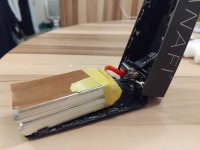
So first things first, some reverse engineering on the anafi's battery : I used a second-hand battery that wasn't reliable (the % reading went from 100% to 0% without doing anything 24h after recharging)

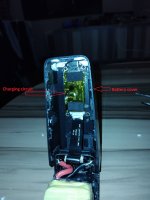
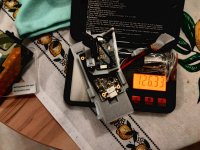
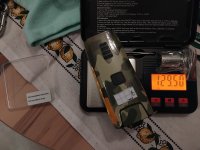
IMG_20251212_191815.jpgIMG_20251212_191837_annotée.jpg

On these two picture you can see the 5 main components of the anafi smart battery :
  • the case
  • the core made of two LiHV cells in series, making a 2S1P pack
  • the power board, where the battery is soldered, on it you have the power connector and the BMS
  • the charging board with the USB-C connector at the end that lets you recharge the battery
  • the flexible ribbon cable that connects the two pcbs
 
  • Like
Reactions: Liger 1956
Now let's dive into the workings of the power PCB :
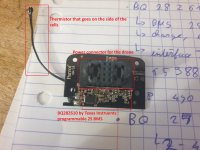
here is the front face, you have on it :
  • a BQ28Z610 a programmable 2S BMS chip by Texas Instruments
  • a (supposedly) 10k NTC thermistor tp monitor the battery's temperature
  • the power and data connector for the drone's mainboard
  • a whole lot of extremely tiny SMD resistors and capacitors
P_pcb.jpg
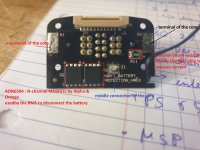
on the back side we have :
  • the three terminals to solder our battery pask (please check by yourselves and note the appropriate polarity, dont trust this diagram, I am not 100% sure I didn't switched + and -)
  • a 1 milli-ohm resitor (0.001 ohm) used by the BQ28Z610 to measure the current getting into and leaving the battery
  • two N-channel MOSFET transistors, AON6504 by Alpha & Omega, used by the BMS chip to disconnect the battery
  • a connector for the flexible ribbon cable
P_pcb_dessous.jpg

Now that the presentations have been done, let's delve into the analysis :
the main chip here, the BQ28Z610 is a programmable 2S BMS chip with a extremely wide range of functionnalities :
  1. the measurements
    1. individual cell voltage measurements
    2. temperature measurement
    3. current flowing throw the battery, both charging
  2. the estimates :
    1. remaining charge
    2. Max charge when fully rehcarged
    3. % remainig
    4. health state of the battery
  3. the programming
    1. the cells' capacity
    2. the overvoltage at room temperature
    3. the undervoltage
    4. the shuttdown voltage
    5. the overcurrent value during charge and discharge
    6. the short-circuit sensitivity
    7. deactivate if you want the balancing function
This chip doesn't take care of charging, only balancing and protection, but as it is it seems extremely capable.

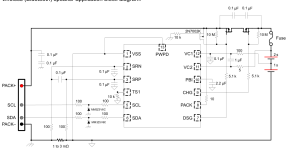
The rest of the components corresponds to the main application circuit given by TI in their datasheet, exception made for the N-channel transistor that aren't the same as the example by TI (not a great deal given that they can bear the expected voltages, 8.8V max and currents, 20A max if I am not wrong). I havent tried every connection as I only have a multimeter at hand for the moment and some resistors are tinier than my testing probe tips, but every component tested corresponds with the schematic below, I havent tried the I2C lines though
schematic P_pcb.png
 
Last edited:

Now for the charging PCB​

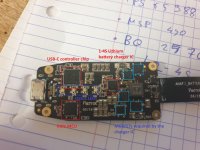
on the upper side we have :
  • TPS 65988 USB-C controller chip by Texas Instruments, used to power everyone, it seems to be able to use the USB-C PD system in order to deliver other voltages than 5V if the power source is compatible
  • MSP 430 G 2533 : a little 16MHz microcontroller by TI
  • 4 dual collor leds used to display the battery status
  • BQ 25703a : a programmable 2-4S battery lithium battery charger by TI
  • CSD 16406 : three N-channel mosfets used by the BQ 25703a to properly charge the Lithium battery
  • CSD 25402Q3a : a P-channel mosfet used by the BQ 25703a to properly charge the Lithium battery
  • an inductor (the little cube in the middle at the end) used by the charger IC to regulate the charging voltage
  • a push button, the one pressed when powering up the drone
  • an IC which I couldn't read for the moment the reference (I need a magnifying glass) next to the button
C_pcb_dessus.jpg

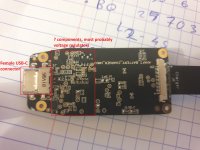
Now for the other side :
  • well nothing much, some ICs have generic markings, and I can't currently read the other ones
  • their size, package, and the abundance of capacitors on both sides makes me think they are some linear voltage regulators used by either the MCU or the charger ic
C_pcb_dessous.jpg

My best guess is the following :
  1. the USB-C controller IC takes care of powering everyone through the USB-C port
  2. when not powered through USB-C (either during discharge or when using a "fast" charger) either the USB C controller or the linear voltage regulators take care of powering the MCU
  3. the charger is programmed to recharge properly the core, letting the BMS take care of balacing the pack, as this chip gets pilotted through I2C to start charging, it might be one of the roles of the MCU
  4. the charging main parameters (voltage limit, current used in CC phase...) are programmed once, by the MCU, when the drone gets an update, it doesn't seem useful to reflash them except if they are lost once power is cut, in that case, tyhey are reprogrammed by the MCU using stored values inside it's EEPROM (which doesn't get erased when unpowered, contrary to flash memory)
  5. the MCU also take care of listenning to the battery's status through the BMS I2C line, and display it on the status leds
  6. the pushbutton seems to be used to wake-up the mcu on the charging board whereas the BMS is always on, except when there is an emergency. When the MCU is woken up, it would try to wake up the drone with a signal on one of the 8 signal pins
 
  • Like
Reactions: Liger 1956

Now the big questions​

Where is the charge estimated, as it's were the main default is ?

Can be either the BMS or the MCU on the reharging board
It seems more plausible that the BMS chip is used, as the functionnality is alreadt there, you can use the shunt resistor (current measure) without to much noise, whereas using a connection through the flexible cable would pick up a lot of noise due to the magnetic fields created by the high currents in the battery and power PCB. In this configuration, the BMS easily measures the charge given by external chargers

What is the core issue when the battery displays 20% and the drone forcefully lands ?

It seems to me that the battery lost along the way some charge or the charge counter in the BMS made a computing error, it could be due to different error sources :
  • aging in the battery mid flight that decrease the real capacity, as such, a battery will seemingly loose a little less than what it was charged with, leading to a few estimated % more the battery really is empty, which adds up afetr every flight, leading to a indication of 20% whereas the battery is empty
  • signal noise due to the high currents and their change (when changing flying behaviour, switching from hover to forward flight, ...) could lead to some errors that get accumulated along the way
  • the BMS trust too much the charge counter, and does not check the voltage mid-flight, only uses the voltage indications during charge and off-use.
What can we simply do to correct the charge counter ?
My simple idea would work with a battery that can be unplugged :
  • you recharge her externally
  • you discharge her inside with an external load or by flying to reach 0%
  • you discharge her completey with an appropriate charger
  • you remount her and charge through the BMS.
Now you have removed the accumulated error and have a reliable battery

I will explain my opinion about using the battery's voltage during flight in an other post later.
 
  • Like
Reactions: Liger 1956
I am impressed with your findings and description of the inner workings of the battery. I don't know whether you are aware but there is a modified Android FF6 app that gives out an actual battery voltage reading on the phone screen. However whether this is accurate or not I have not checked. The app is on a sticky thread at the top of this forum.

Nobody, as far as I know, has managed to determine what the pin outs of the battery to drone connector are except for the positive and negative. If we could it might be possible to get rid of all the battery pcb's and charge the battery using a normal hobby charger. However this would mean that we would need to know how the button press on the battery is translated into a signal to energis and shut down the Anafi and how the remaing battery voltage is read by the Anafi and transmitted to the FF6 app.

I will await the next installment of your findings.
 
Excellent reference engineering description of the Anafi battery. Of particular interest was how overtime the BMS can become logically corrupted by noise and how you explain how to prevent/counter that logical corruption. :cool:
 
Sorry to not have updated this thread for two weeks, I struggle a bit to balance between engineering lessons, clubs, spare time and wasted time (pointless scrolling). I went a bit further in the analisis :

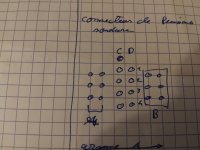
1) the main connector :

you have a diagram of the different pins of the main connector, the view is on the solder joints' side, and their assigned refference


IMG_20260115_190424.jpg
group A is for the + connection of the battery, group B for the -, and you have 8 pins for communications
The BMS output's is connected straight to the main connector, and the charging board is connected in parallel to the main power connection to recharge the battery through the BMS. This way, the charger pcb doesn't need to do the balancing work, the BMS properly measures the charge getting inside the core, and you can recharge the battery with an aftermarket external charger as everything wil go through the BMS.
The only downside with aftermarket chargers is if they deliver to much current to a reallyunbalanced pack (in the case of one of the cells having a really lower capacity) the balancing part of the BMS might not be able to sink enough current to avoid overcharging one of the cells, which could lead to aging.

TLDR :
can you use an aftermarket fast charger once ? Yes
will it cause problems due to imbalance ? No as the BMS should do the balancing by itself
Do I recommend it ? No because a slower charge is better for the battery life, and it might not work very well in the long run

pin D3 is connected to the ground reference wich is the battery - terminal (before or after the BMS, I can't tell as I can't tell if I am connected before or after the 1mili-ohm shunt resistor)
If I recall correctly, there wasn't any pin connected to the middle of the pack, the BMS seems to do everything by itself just fine

2) the flexible ribbon cable
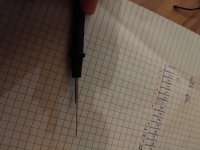
Just a tip to be able to probe the extremely tiny contacts with a standard multimeter :
the testing leads tips are way too big, we are speaking about .3mm contacts
  • roll a piece of tape around 1/3 of the perimiter of the tip
  • hold a sewing needle on the exposed tip were there isn't already some tape
  • tighten the needle in place with the tape by pulling on the tape once having made a U turn around the needle
  • roll the remaining tape around the tip and needle to keep them in place
it works really well, just adds 1-4 ohms of resistance between the testing probes, not an issue when dong continuity testing with the beeper function
IMG_20260107_204253.jpg

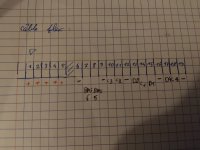
So what connections do we have on the ribbon cable ?
IMG_20260115_190411.jpg

  • pins 1-5 are used to connect the charger ic to the + pole of the core
  • pins 6,9,12,16 and 19 are used to deliver the ground reference (either for the - pole of the battery or for signals)
  • pins 7 and 8 connected to the BMS I2C interface, IE it's a connection used to let the charger PCB talk to the BMS, i think that is what is used by the microcontroller on the charger side to get the battery level estimation to display on the LEDs and feed it to the drone
  • the other 7 pins are used for the communication between charging PCB and drone, as I explained, D3 is connected to the ground
3) Re-wiring the batteries
lastly, my efforts have went towards re-wiring some battery packs to be able to swap them easily
I have several packs which seems to be LI-HV packs, but I can't be sure

  • the core from the battery that is used for this analysis, (which was clearly a crappy job done by a third party as the solder joints were extremely poor), but surely a Li-HV as it wasn't bothered by being charged by the parrot charging board
  • a set of two cells, with similar markings
  • a 2S1P pack which really seems to be the old core from the disassembled battery, before it was swapped, as the markings are similar to ones from this video :
Now I can definitely say that Solaris8x86 selling a dangerous product with his "replacement cells" for the ANAFI, why ?
On each battery cell that I tried to solder, one terminal is made out of Aluminium which CAN'T be soldered with conventionnal equipment : the common solder doesn't stick as the aluminium forms an oxide layer that protects it from corrosion and soldering (with simple contact of the air, it happens in a matter of mili-seconds)
It's a common issue when soldering lithium cells, you need special equipment tailored for aluminium soldering

The result ? the tin doesn't stick at all to the terminal, or extremely poorly, you need to heat up A LOT the terminal just to try to have a proper solder when the inside of the battery pack is just a few mm away, sealed with a polymer adhesive that doesn't like heat. (major fumes and fire hazard if you didn't understand)
The consensus in the few video I found is that you should NEVER heat up a cell's terminal more than 5s, and without deidcated solder or flux, you will never have tin porperly sticking to aluminium in such a short time

I will take another chance at this soldering when I will have received some special solder (alusol from loctite), special soldering flux (pure aluminium flux), and tried a few times on soda cans beforehand.

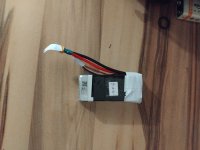
Here I could re_wire properly one of the packs as every terminal was properly soldered beforehand (it's the one I think was an old parrot pack)IMG_20260115_185721.jpg
 
The next objectives of the analisis :
  • find at least pictures of other disassembled parrot batteries to ensure I have really re-wired a LIHV pack from parrot and not a LIPO pack
  • probe around to see if there is a dirrect connection between the battery's button and the main connector, it would give insights as how the drones is powered-on
  • design and print a part to make an opened battery that can be secured on the anafi's battery holder, it wil help when trying different battery packs
  • salvage the battery connector from a fast charger, as I won's use them to be able to interface an anafi battery to a standard drone charger (I have the toolkitRC m6D)
 
A quick update on the project :
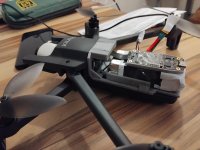
I spent my sunday with my 3d printer (I love my prusa mini) and finalised a complete battery holder for flight testing 1000014696.jpg
It's made of five printed parts :
  • The hook : a plate with three teeth to hold into the holes of the battery bay
  • The power pcb holder : glued to the hook, it holds the power pcb with it's original 4 screws
  • The lock : a flexible part to be able to reuse the battery locking function
  • The battery wall : a 10mm high u shaped wall to center the battery in place, it can be swapped with another one to fit batteries less than 32mm wide (34mm might be doable, for larger it will need to widen the hook plate)
  • The charger isolator : as the charging board is taped to the battery pack, I gave it a little case to avoid the risk of short-circuits
 
As it is for now, the battery is held in place with simple transparent tape and the charging board gets taped on top of it. I made sure to at least make a full turn of tape to avoid everything falling apart in mid-air.
I will post the 3d files at another time, just know that the parts' fit depends on the printer's precision, and mine is extremely reliable, i can use .1mm tolerance whereas others need .5mm so you might need to sand down some parts to make them fit if you want to use them
 
Hi! Very interesting thread you got here, I am impressed that someone else is as obsessed with the Anafi despite it being quite an old drone and very rare find these days, you have done an excellent job in your research with the batteries which are obiously the weakest point of the Anafi all and all and indeed we start to be at a point in the drones evolution where the DIY part starts because the batteries AND parts, especially the mainboard-camera combo will become more rare to find every year, you mentioned above that some of the cells have aluminum solder points and cannot be soldered, I have refurbished several of my batteries with these "https://www.aliexpress.com/item/100....order_list.order_list_main.36.57a01802ljFUyM" cells with great success even thou I dont no if I did it right or wrong, they have nickel solder points and are very easy to solder and the overall quality of the cells is very good, after the refurbishment the battery shows 95% to 98% health, the downside is that the cells with these specs, especially the size are very hard to find and it always takes nearly a month for them to arrive here in Finland, so if someone knows a more easy to obtain cell type that fit the Anafi battery casing I would be very happy to hear about them, but good job there, it was very interesting to read your post.
 
  • Like
Reactions: Zter and 70Falcon
Hello to everyone who follows that subject, and to the other who comes to take a look.
I didn't post any messages for two months for a simple reason :
Due to my engineering studies, I need to do some time abroad, and so I am currently in Portugal in a university exchange (Erasmus). I will be back home in the beginning of July.

I tried to bring some equipment here to continue on the project, but I have neither the time, nor the tools, not to mention I wouldn't bring back some modified LiPos inside an airplane (to go back home), the consequences in case of battery fire would be absolutely disastrous.
I am not judging anyone, it's just that with Lithium ion batteries, the fire hazard is absolutely present and mustn't be forgotten, no matter what anyone says, and in the enclosed cabin of an airliner, such a fire would be an absolute nightmare, so even if the risk is low, I don't want to take it.

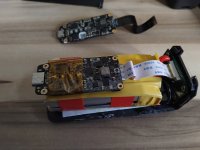
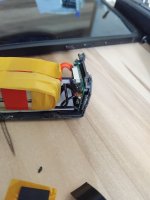
Before going, I did disassemble the GiFI power battery, (two pictures below)
IMG_20260212_164047.jpgIMG_20260212_164647.jpg

All in all, it seems to me that those are a not so bad copy :
  • the BMS chip seems genuine
  • the charging board seems to be a good carbon copy
Some differences are understandable
  • green pcb for the BMS, instead of the black one (a few cents cheaper per board )
  • little screws with extremely wide threads to hold the BMS in place instead of the precision one on the Parrot model (you can see some of them aren't properly vertical, they are screwed diagonally
  • commercial off-the-shelf ribbon cable (in white) instead of the custom-made one in the parrot battery
But there are some differences that made me raise an eyebrow :
  • why is the pack assembled with electrical tape ?
  • different transistor chips on the BMS, you can always find a compatible component, but are those properly sized in terms of voltage, max current, control voltages, resistance in conductive state ?
  • Why is the black wire of the battery ill-colored ? (the isolation is 75% red instead of solid black). It might be a manufacturing defect when they began making black wire from red wire, but it doesn't makes me confident in it's quality
  • why isn't there any AWG markings on the battery cables like on the Parrot one, and most consumer electronics ? I have no way to verify if the cable is properly sized in terms of current limit
  • No gold plating on the power connector, only some zinc plating ? It's not just a matter of looks, it's a matter of max current due to localised contact resistance and connector aging due to oxydation.
All in all, it's not that bad of a battery, but I won't use those personally, as from what I see, some corners have been cut, and so I don't know if the battery is reliable or not.
It's an open secret in the electronics geek community that some Chinese manufacturers buy the scrapped off-specs chips from chip makers, or worse, change the marking on an inferior chip to hide cost-cutting (they engrave a new marking with lasers on the chip's package) and use them nonetheless in their products, believing that there wouldn't be too much effect on their business with 5% falty products.

A Lipo battery is something that can be extremely dangerous in terms of fire hazard, so I am not taking chances. You can do your own choices.
 

New Posts

Members online

No members online now.

Forum statistics

Threads
5,496
Messages
45,601
Members
9,025
Latest member
donaldp63029